什么是 vue-highlight-words?
vue-highlight-words 是一个专为 Vue.js 设计的文本高亮组件,它能够帮助你在文本中快速高亮显示指定的关键词。这个库特别适合用于搜索结果显示、关键词标记、文本分析等场景。
主要特性
- 简单易用 – 几行代码就能实现文本高亮
- 精准匹配 – 支持精确匹配和模糊匹配
- 自定义样式 – 可以自定义高亮文本的样式
- 性能优秀 – 轻量级,不会影响应用性能
- Vue 兼容 – 支持 Vue 2 和 Vue 3
- 灵活配置 – 支持多种配置选项
快速上手
安装
pnpm add vue-highlight-words基本用法
<template>
  <div>
    <HighlightWords
      highlightClassName="highlight"
      :autoEscape="true"
      :textToHighlight="text"
      :searchWords="['高亮']"
    />
  </div>
</template>

<script setup>
  import { ref } from "vue";
  import HighlightWords from "vue-highlight-words";

  const text = ref("前端开发技术前沿,这是“高亮”的示例文本");
</script>

<style>
  .highlight {
    background-color: yellow;
    font-weight: bold;
  }
</style>
API 参数详解
Props 参数
| 参数名 | 说明 |
|---|---|
highlightClassName | 高亮文本的 CSS 类名 |
autoEscape | 是否自动转义特殊字符 |
textToHighlight | 要高亮显示的文本内容 |
searchWords | 要搜索的关键词数组 |
highlightStyle | 自定义高亮文本的样式 |
sanitize | 是否对高亮文本进行 HTML 转义 |
findChunks | 自定义函数,用于将文本分割为可高亮的块 |
activeClassName | 要应用于当前匹配项的类名。与以下方式一起使用:activeIndex |
activeIndex | 指定要突出显示的匹配索引。与以下方式一起使用:activeClassName |
activeStyle | 要应用于当前匹配项的内联样式。与以下方式一起使用:activeIndex |
caseSensitive | 搜索应区分大小写;默认为大写。false |
findChunks | 使用自定义函数搜索匹配的文本块。 |
高级使用
自定义样式
<template>
  <HighlightWords
    textToHighlight="前端开发技术前沿,这是“高亮”的示例文本"
    :searchWords="['高亮', '前端开发技术前沿']"
    :highlightStyle="{
        backgroundColor: '#ffeb3b',
        color: '#333',
        padding: '2px 4px',
        borderRadius: '3px',
      }"
  />
</template>
区分大小写
<template>
  <HighlightWords
    textToHighlight="前端开发技术前沿,这是“高亮”的示例文本, vue"
    :searchWords="['高亮', '前端开发技术前沿', 'Vue']"
    :highlightStyle="{
        backgroundColor: '#ffeb3b',
        color: '#333',
        padding: '2px 4px',
        borderRadius: '3px',
      }"
    :caseSensitive="true"
  />
</template>
实际应用场景
搜索功能
<template>
  <div class="container mx-auto px-4 py-8 max-w-2xl">
    <div class="bg-white rounded-xl shadow-md p-6">
      <h1 class="text-2xl font-bold text-gray-800 mb-4">关键词搜索</h1>
      <input
        v-model="searchTerm"
        placeholder="输入搜索关键词"
        class="w-full px-4 py-3 rounded-lg border border-gray-300 focus:outline-none focus:ring-2 focus:ring-blue-500 focus:border-transparent transition-all duration-200"
      />

      <div class="mt-6">
        <div v-if="searchResults.length > 0" class="space-y-3">
          <div
            v-for="(result, index) in searchResults"
            :key="index"
            class="p-4 bg-gray-50 rounded-lg hover:bg-gray-100 transition-colors duration-200"
          >
            <HighlightWords
              :textToHighlight="result.content"
              :searchWords="searchTerm.split(' ')"
              highlightClassName="bg-yellow-200 font-medium px-1 rounded"
            />
          </div>
        </div>
        <div v-else-if="searchTerm" class="text-center py-8 text-gray-500">
          没有找到匹配的内容
        </div>
        <div v-else class="text-center py-8 text-gray-500">
          请输入关键词进行搜索
        </div>
      </div>
    </div>
  </div>
</template>

<script setup>
  import { ref, computed } from "vue";
  import HighlightWords from "vue-highlight-words";

  const searchTerm = ref("");
  const allContent = ref([
    { content: "Vue.js 是一个用于构建用户界面的渐进式框架" },
    { content: "React 是一个用于构建用户界面的 JavaScript 库" },
    { content: "Angular 是一个基于 TypeScript 的开源 Web 应用框架" },
  ]);

  const searchResults = computed(() => {
    if (!searchTerm.value) return allContent.value;
    return allContent.value.filter((item) =>
      item.content.toLowerCase().includes(searchTerm.value.toLowerCase())
    );
  });
</script>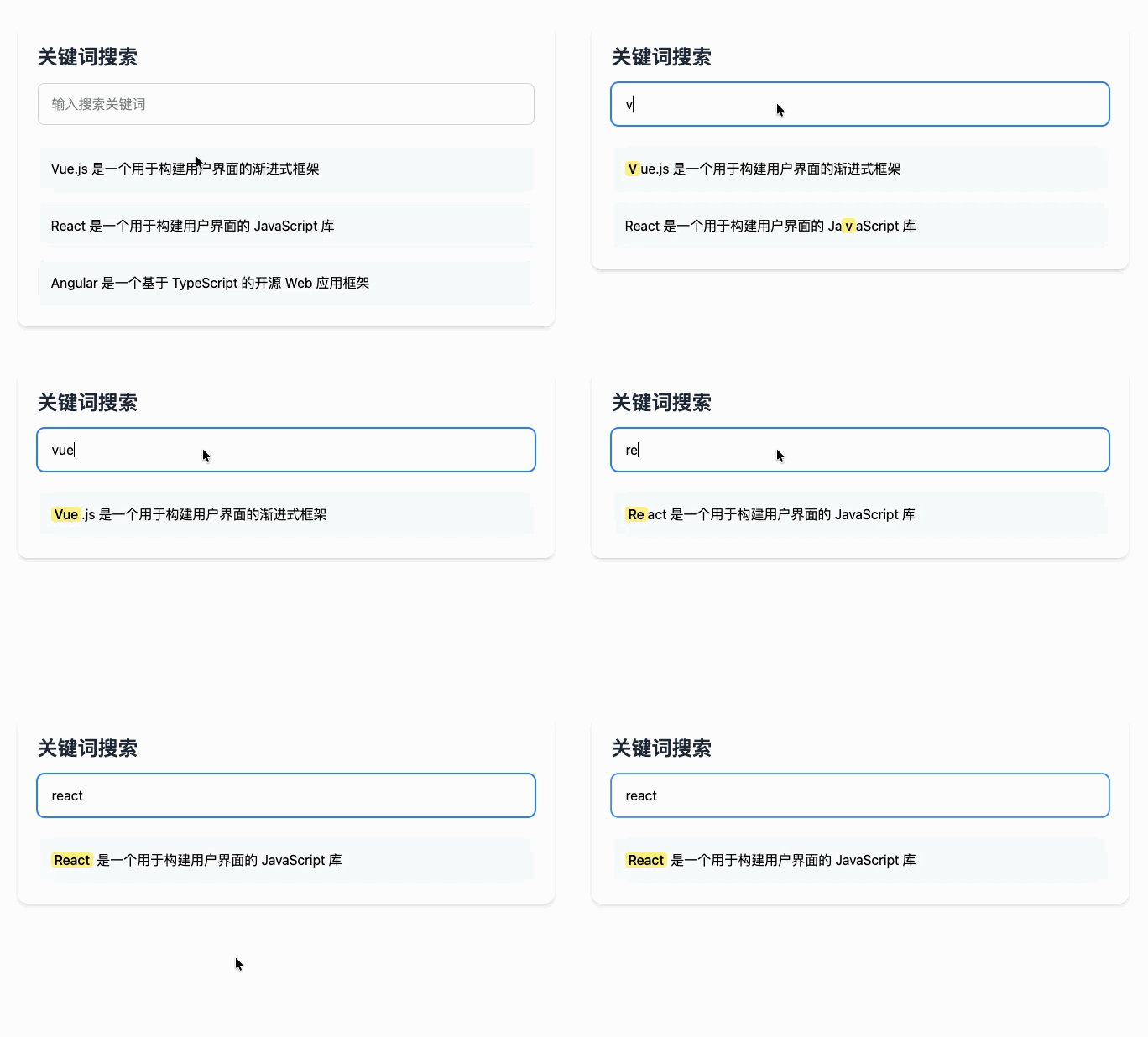
关键词标记
<template>
  <div class="article-content">
    <HighlightWords
      :textToHighlight="articleContent"
      :searchWords="keywords"
      :highlightStyle="{
        backgroundColor: '#e3f2fd',
        color: '#1976d2',
        fontWeight: 'bold',
      }"
    />
  </div>
</template>

<script setup>
  import { ref } from "vue";
  import HighlightWords from "vue-highlight-words";

  const articleContent = ref(`
  Vue.js(读音 /vjuː/,类似于 view)是一套用于构建用户界面的渐进式框架。
  与其他大型框架不同的是,Vue 被设计为可以自底向上逐层应用。
  Vue 的核心库只关注视图层,不仅易于上手,还便于与第三方库或既有项目整合。
`);

  const keywords = ref(["Vue", "框架", "用户界面"]);
</script>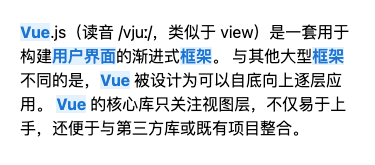
代码高亮
<template>
  <pre>
    <HighlightWords
      :textToHighlight="codeContent"
      :searchWords="highlightWords"
      highlightClassName="code-highlight"
    />
  </pre>
</template>

<script setup>
  import { ref } from "vue";
  import HighlightWords from "vue-highlight-words";

  const codeContent = ref(`
function hello() {
  console.log('Hello Vue!');
  return 'Welcome to Vue.js';
}
`);

  const highlightWords = ref(["function", "console", "return"]);
</script>

<style>
  .code-highlight {
    background-color: #f0f0f0;
    color: #d63384;
    padding: 1px 3px;
    border-radius: 2px;
    font-family: "Courier New", monospace;
  }
</style>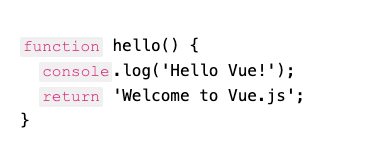
常见问题解答
Q1: 支持正则表达式吗?
A: vue-highlight-words 主要支持字符串匹配,如果需要复杂的正则表达式匹配,建议使用其他专门的库。
Q2: 性能如何?
A: 对于普通文本(几千字以内)性能非常好。对于大量文本,建议分页或分段处理。
Q3: 支持国际化吗?
A: 完全支持,可以高亮任何语言的文本。
Q4: 可以高亮 HTML 内容吗?
A: 出于安全考虑,建议只对纯文本进行高亮。如果需要高亮 HTML,请先提取文本内容。
Q5: Vue 2 和 Vue 3 都支持吗?
A: 是的,但需要根据 Vue 版本选择合适的安装和使用方式。
总结
vue-highlight-words 是一个简单实用的文本高亮库,它能够帮助开发者快速实现文本高亮功能。无论是搜索功能、关键词标记还是代码高亮,都能很好地胜任。
原文链接:https://code.ifrontend.net/archives/1468,转载请注明出处。


评论0